使用 Sentence Transformers 微調多模態 EmbeddingGemma 2

EmbeddingGemma 2 能將文字、圖像、音訊和影片映射到統一的 768 維向量空間。因此,您可以使用與文字相同的 Sentence Transformers 訓練管線,在跨模態三元組(例如 (text_query, positive_image, negative_image))上對其進行微調。
注意
本指南需要支援 bfloat16 資料型別的 GPU,例如 NVIDIA L4 或 NVIDIA A100。
範例情境:韓國水墨畫典藏搜尋
想像您正在為一場傳統朝鮮王朝韓國畫作的博物館展覽,打造一個數位典藏搜尋引擎:
- Shin Yunbok, Dano Pungjeong (Scenery on Dano Day) (
ink-wash-1.png):描繪端午節期間女子在溪邊沐浴、盪鞦韆的風俗畫(pungsokhwa)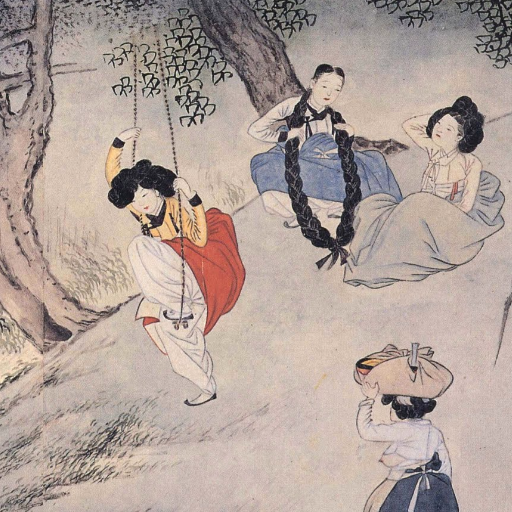
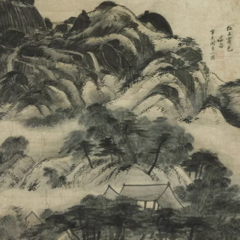
- Jeong Seon, Inwangjesaekdo (Clearing after Rain on Mount Inwang) (
ink-wash-2.png):描繪雨後仁王山花崗岩峰巒自霧中浮現的真景山水畫(jingyeong sansuhwa)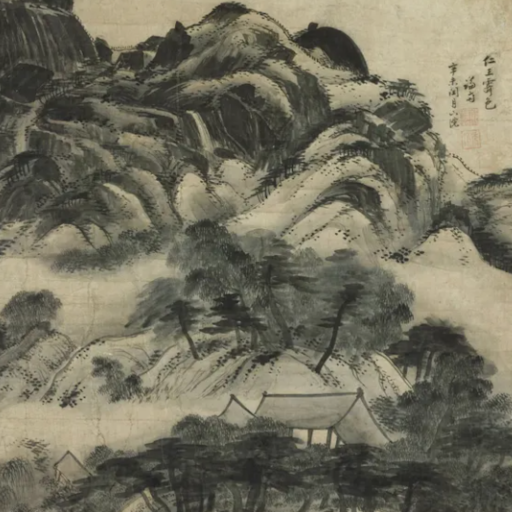
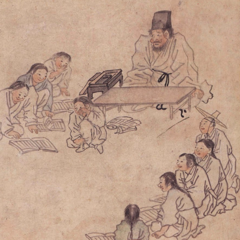
- Kim Hongdo, Seodang (Village School) (
ink-wash-3.png):描繪鄉村書塾老師、哭泣的學生與竊笑同學的風俗畫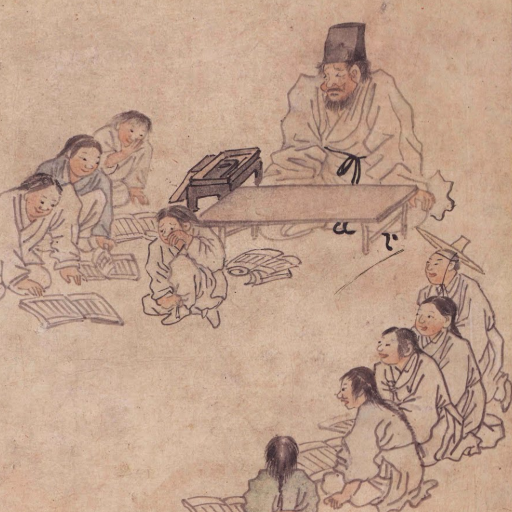
開箱即用的 EmbeddingGemma 2 在給定描述性場景說明文字(例如 "Scenery on Dano Day" 或 "Village School")時,可以檢索出正確的畫作。但是,當使用者僅以畫家姓名搜尋(例如 "Show me an ink wash painting of Shin Yunbok.")時,模型面對三幅視覺上相似的傳統韓國水墨畫作,若缺乏特定領域的畫家歸屬知識,就可能排錯順序。
本指南涵蓋:
- 安裝相依套件,並載入具備文字與視覺編碼器的 EmbeddingGemma 2 (
google/embeddinggemma-2) - 在微調前評估基準 文字轉圖像檢索效能(比較以畫家為基礎的查詢與描述性場景查詢)
- 準備將畫家姓名連結到其畫作的跨模態
(anchor, positive, negative)訓練三元組 - 使用
SentenceTransformerTrainer、MultipleNegativesRankingLoss與欄位特定的任務提示(task prompt)微調模型 - 評估訓練後的改善情況,並儲存您調適後的多模態模型
第一次使用 EmbeddingGemma 2 做多模態推論?
請參閱 EmbeddingGemma 2 多模態嵌入,了解圖像、音訊、影片與交錯式輸入的概覽。
設定與安裝
安裝用於圖像處理的 sentence-transformers、transformers、datasets 和 pillow。
Sentence Transformers 是一個用於使用與訓練嵌入(embedding)及重排序(reranker)模型的 Python 框架。如需更多框架細節,請參閱 Sentence Transformers 文件。
(選用)Hugging Face 驗證
您需要有效的 Hugging Face Token 才能發佈模型。若您在 Google Colab 內執行,可以從 Colab 密鑰安全載入 Hugging Face Token;否則可以直接將 Token 傳給 login()。如果您打算將微調後的模型推送到 Hub,請確保 Token 具有寫入權限。
載入基礎模型
使用 SentenceTransformer 載入 google/embeddinggemma-2。
from sentence_transformers import SentenceTransformer

model_id = "google/embeddinggemma-2"
model = SentenceTransformer(
    model_id,
    config_kwargs={"audio_config": None},
)

print(f"Device: {model.device}")
print(f"dtype: {model.dtype}")
print(model)
print("Total number of parameters in the model:", sum(p.numel() for p in model.parameters()))
Loading weights:   0%|          | 0/624 [00:00<?, ?it/s]
Device: cuda:0
dtype: torch.bfloat16
SentenceTransformer(
  (0): Transformer({'transformer_task': 'feature-extraction', 'modality_config': {'text': {'method': 'forward', 'method_output_name': 'last_hidden_state'}, 'image': {'method': 'forward', 'method_output_name': 'last_hidden_state'}, 'audio': {'method': 'forward', 'method_output_name': 'last_hidden_state'}, 'video': {'method': 'forward', 'method_output_name': 'last_hidden_state'}, 'message': {'method': 'forward', 'method_output_name': 'last_hidden_state', 'format': 'structured'}}, 'module_output_name': 'token_embeddings', 'architecture': 'EmbeddingGemma2Model'})
  (1): Pooling({'embedding_dimension': 768, 'pooling_mode': 'mean', 'include_prompt': True})
  (2): Normalize({'module_input_name': 'sentence_embedding', 'module_output_name': 'sentence_embedding'})
)
Total number of parameters in the model: 438760448
Tip
由於本教學是在文字與圖像資料上微調,我們在初始化時傳入 config_kwargs={"audio_config": None} 來省略音訊編碼器,以減少訓練期間的 GPU 記憶體使用量。如果您的微調資料集也包含音訊,請使用預設設定初始化 SentenceTransformer(model_id) 以載入所有模態編碼器。
精度說明
EmbeddingGemma 2 的活化值與 float16 不相容。請使用 bfloat16(支援的 GPU 上為預設值)或 float32。
基準評估(微調前)
首先,載入三幅朝鮮王朝水墨畫,並測試基礎模型在訪客以畫家姓名搜尋時的排名:
「向我展示一幅 Shin Yunbok 的水墨畫。」
我們的三幅候選畫作:
- Shin Yunbok, Dano Pungjeong (Scenery on Dano Day) (
ink-wash-1.png) — 正確匹配 - Jeong Seon, Inwangjesaekdo (Clearing after Rain on Mount Inwang) (
ink-wash-2.png) — 困難負樣本 - Kim Hongdo, Seodang (Village School) (
ink-wash-3.png) — 困難負樣本
from PIL import Image
from IPython.display import display
import requests

IMAGE_SIZE = 240

def load_image(url):
    return Image.open(requests.get(url, stream=True).raw).convert("RGB").resize((IMAGE_SIZE, IMAGE_SIZE))

# Load Korean ink wash paintings
ink_wash_1 = load_image("https://github.com/bebechien/gemma/raw/refs/heads/main/images/ink-wash-1.png")
ink_wash_2 = load_image("https://github.com/bebechien/gemma/raw/refs/heads/main/images/ink-wash-2.png")
ink_wash_3 = load_image("https://github.com/bebechien/gemma/raw/refs/heads/main/images/ink-wash-3.png")

task_name = "Retrieval-query"
query = "Show me an ink wash painting of Shin Yunbok."

candidates = [
    {"label": "Shin Yunbok, Dano Pungjeong (Scenery on Dano Day)", "image": ink_wash_1},
    {"label": "Jeong Seon, Inwangjesaekdo (Clearing after Rain on Mount Inwang)", "image": ink_wash_2},
    {"label": "Kim Hongdo, Seodang (Village School)", "image": ink_wash_3},
]

for item in candidates:
    print(item["label"])
    display(item["image"])

def evaluate_retrieval(query_text, candidate_items):
    print(f"Query: {query_text}")
    query_emb = model.encode(query_text, prompt_name=task_name)
    image_embs = model.encode([item["image"] for item in candidate_items])
    similarities = model.similarity(query_emb, image_embs)[0]

    for item, score in zip(candidate_items, similarities):
        print(f"Painting: {item['label']:<66} -> 🤖 Score: {score.item():.4f}")

print("-"*80)
print("Baseline Scores (Before Fine-Tuning):")
evaluate_retrieval(query, candidates)
--------------------------------------------------------------------------------
Baseline Scores (Before Fine-Tuning):
Query: Show me an ink wash painting of Shin Yunbok.
Painting: Shin Yunbok, Dano Pungjeong (Scenery on Dano Day)                  -> 🤖 Score: 0.6753
Painting: Jeong Seon, Inwangjesaekdo (Clearing after Rain on Mount Inwang)   -> 🤖 Score: 0.7005
Painting: Kim Hongdo, Seodang (Village School)                               -> 🤖 Score: 0.6631
跨模態搜尋任務提示說明
任務專用提示前綴僅適用於文字輸入。在此我們以 prompt_name="Retrieval-query"("task: search result | query: ")編碼文字查詢,並直接編碼候選圖像(不加文字前綴)。如需所有可用提示的細節,請參閱 EmbeddingGemma 2 模型卡。
為什麼基準查詢排錯了畫作順序?
在上述基準評估中,搜尋 "Show me an ink wash painting of Shin Yunbok." 排錯了候選順序:基礎模型給 Jeong Seon 的 Inwangjesaekdo 的相似度分數最高,而非真正的匹配 Shin Yunbok 的 Dano Pungjeong。
請注意,當您提供關於視覺場景本身的描述性說明文字(例如下方的 "Dano Pungjeong (Scenery on Dano Day)" 或 "Seodang (Village School)")時,基礎模型確實能開箱即用檢索出正確圖像。然而,由於畫家姓名("Shin Yunbok")是領域元資料(metadata),而非場景的字面視覺描述,因此需要微調來教會模型將每位畫家與其畫作關聯起來。
query_desc = "Dano Pungjeong (Scenery on Dano Day)"
evaluate_retrieval(query_desc, candidates)

print("-"*80)
query_desc = "Seodang (Village School)"
evaluate_retrieval(query_desc, candidates)
Query: Dano Pungjeong (Scenery on Dano Day)
Painting: Shin Yunbok, Dano Pungjeong (Scenery on Dano Day)                  -> 🤖 Score: 0.6892
Painting: Jeong Seon, Inwangjesaekdo (Clearing after Rain on Mount Inwang)   -> 🤖 Score: 0.6767
Painting: Kim Hongdo, Seodang (Village School)                               -> 🤖 Score: 0.6478
--------------------------------------------------------------------------------
Query: Seodang (Village School)
Painting: Shin Yunbok, Dano Pungjeong (Scenery on Dano Day)                  -> 🤖 Score: 0.6777
Painting: Jeong Seon, Inwangjesaekdo (Clearing after Rain on Mount Inwang)   -> 🤖 Score: 0.6782
Painting: Kim Hongdo, Seodang (Village School)                               -> 🤖 Score: 0.6997
準備多模態微調資料集
為了教會模型將每位朝鮮王朝大師與其作品關聯起來,我們將訓練資料組織為跨模態對比三元組:(anchor, positive, negative):
anchor(文字):畫家姓名("Shin Yunbok"、"Jeong Seon"、"Kim Hongdo")。positive(圖像):該畫家對應的PIL.Image畫作。negative(圖像):另一位畫家的傳統韓國水墨畫,作為視覺困難負樣本。
SentenceTransformerTrainer 會自動檢查每個欄位的模態,並透明地預處理文字與圖像——無需手動分詞或像素預處理。
from datasets import Dataset

triplets = [
    [
        "Shin Yunbok",
        ink_wash_1,
        ink_wash_2,
    ],
    [
        "Jeong Seon",
        ink_wash_2,
        ink_wash_3,
    ],
    [
        "Kim Hongdo",
        ink_wash_3,
        ink_wash_1,
    ],
]

# Convert into a Hugging Face Dataset with text 'anchor' and image 'positive'/'negative' columns
data_as_dicts = [
    {"anchor": row[0], "positive": row[1], "negative": row[2]}
    for row in triplets
]
train_dataset = Dataset.from_list(data_as_dicts)
print(train_dataset)
提示(其他多模態格式)
在交錯式輸入上訓練時,資料集欄位也可以包含圖像檔案路徑/URL、音訊波形、影片路徑,或像 {"text": "caption", "image": pil_image} 這樣的多模態字典。
Note
為示範起見,我們在下方建立一個僅含 3 個跨模態三元組的精簡資料集。在實際生產應用中,請使用數百或數千個特定領域的配對或三元組,以達到穩健的泛化能力。
微調多模態模型
我們使用 SentenceTransformerTrainer 和 MultipleNegativesRankingLoss 微調模型;此損失函數會將 (anchor, positive) 文字-圖像配對在共享的 768 維嵌入空間中拉近,同時將 (anchor, negative) 配對(以及批次內的負樣本)推遠。
關鍵是:由於只有 anchor 欄位包含文字,而 positive 和 negative 包含圖像,我們在 SentenceTransformerTrainingArguments 中傳入欄位特定的提示映射 prompts={"anchor": model.prompts[task_name]}。這能確保任務前綴只加到文字查詢上,而不會加到圖像輸入上。
from sentence_transformers import (
    SentenceTransformerTrainer,
    SentenceTransformerTrainingArguments,
)
from sentence_transformers.sentence_transformer.losses import MultipleNegativesRankingLoss
from transformers import TrainerCallback

# Initialize contrastive ranking loss
loss = MultipleNegativesRankingLoss(model)

# Configure training arguments
args = SentenceTransformerTrainingArguments(
    output_dir="my-multimodal-embeddinggemma-2",
    prompts={"anchor": model.prompts[task_name]},  # Apply task prompt prefix only to the text 'anchor' column
    num_train_epochs=5,
    per_device_train_batch_size=1,
    learning_rate=2e-5,
    bf16=True,                                     # EmbeddingGemma 2 uses bfloat16 (incompatible with fp16)
    fp16=False,
    logging_steps=train_dataset.num_rows,
    report_to="none",
)

class EvaluationCallback(TrainerCallback):
    """Callback that evaluates cross-modal retrieval scores at each logging step."""

    def __init__(self, eval_fn):
        self.eval_fn = eval_fn

    def on_log(self, args, state, control, **kwargs):
        print(f"\n--- Step {state.global_step} Evaluation ---")
        self.eval_fn()

trainer = SentenceTransformerTrainer(
    model=model,
    args=args,
    train_dataset=train_dataset,
    loss=loss,
    callbacks=[EvaluationCallback(lambda: evaluate_retrieval(query, candidates))],
)

trainer.train()
Computing widget examples:   0%|          | 0/1 [00:00<?, ?example/s]
 [15/15 00:19, Epoch 5/5]
Step    Training Loss
3   1.000404
6   0.602180
9   0.364761
12  0.281820
15  0.247832

--- Step 3 Evaluation ---
Query: Show me an ink wash painting of Shin Yunbok.
Painting: Shin Yunbok, Dano Pungjeong (Scenery on Dano Day)                  -> 🤖 Score: 0.7203
Painting: Jeong Seon, Inwangjesaekdo (Clearing after Rain on Mount Inwang)   -> 🤖 Score: 0.6359
Painting: Kim Hongdo, Seodang (Village School)                               -> 🤖 Score: 0.6785

--- Step 6 Evaluation ---
Query: Show me an ink wash painting of Shin Yunbok.
Painting: Shin Yunbok, Dano Pungjeong (Scenery on Dano Day)                  -> 🤖 Score: 0.7185
Painting: Jeong Seon, Inwangjesaekdo (Clearing after Rain on Mount Inwang)   -> 🤖 Score: 0.6257
Painting: Kim Hongdo, Seodang (Village School)                               -> 🤖 Score: 0.6610

--- Step 9 Evaluation ---
Query: Show me an ink wash painting of Shin Yunbok.
Painting: Shin Yunbok, Dano Pungjeong (Scenery on Dano Day)                  -> 🤖 Score: 0.7107
Painting: Jeong Seon, Inwangjesaekdo (Clearing after Rain on Mount Inwang)   -> 🤖 Score: 0.6157
Painting: Kim Hongdo, Seodang (Village School)                               -> 🤖 Score: 0.6544

--- Step 12 Evaluation ---
Query: Show me an ink wash painting of Shin Yunbok.
Painting: Shin Yunbok, Dano Pungjeong (Scenery on Dano Day)                  -> 🤖 Score: 0.7067
Painting: Jeong Seon, Inwangjesaekdo (Clearing after Rain on Mount Inwang)   -> 🤖 Score: 0.6129
Painting: Kim Hongdo, Seodang (Village School)                               -> 🤖 Score: 0.6515

--- Step 15 Evaluation ---
Query: Show me an ink wash painting of Shin Yunbok.
Painting: Shin Yunbok, Dano Pungjeong (Scenery on Dano Day)                  -> 🤖 Score: 0.7070
Painting: Jeong Seon, Inwangjesaekdo (Clearing after Rain on Mount Inwang)   -> 🤖 Score: 0.6126
Painting: Kim Hongdo, Seodang (Village School)                               -> 🤖 Score: 0.6522
Writing model shards:   0%|          | 0/1 [00:00<?, ?it/s]

--- Step 15 Evaluation ---
Query: Show me an ink wash painting of Shin Yunbok.
Painting: Shin Yunbok, Dano Pungjeong (Scenery on Dano Day)                  -> 🤖 Score: 0.7070
Painting: Jeong Seon, Inwangjesaekdo (Clearing after Rain on Mount Inwang)   -> 🤖 Score: 0.6126
Painting: Kim Hongdo, Seodang (Village School)                               -> 🤖 Score: 0.6522
TrainOutput(global_step=15, training_loss=0.49939937591552735, metrics={'train_runtime': 20.5693, 'train_samples_per_second': 0.729, 'train_steps_per_second': 0.729, 'total_flos': 0.0, 'train_loss': 0.49939937591552735, 'epoch': 5.0})
微調後評估
讓我們在微調後的模型上再執行一次測試查詢,並將訓練後的跨模態相似度分數與基準比較:
Post-Training Scores (After Fine-Tuning):
Query: Show me an ink wash painting of Shin Yunbok.
Painting: Shin Yunbok, Dano Pungjeong (Scenery on Dano Day)                  -> 🤖 Score: 0.7070
Painting: Jeong Seon, Inwangjesaekdo (Clearing after Rain on Mount Inwang)   -> 🤖 Score: 0.6126
Painting: Kim Hongdo, Seodang (Village School)
微調後有什麼改變?
在微調前,三幅朝鮮王朝畫作具有相似的傳統韓國水墨美學,導致基礎模型在查詢 "Show me an ink wash painting of Shin Yunbok." 時,將 Jeong Seon 的 Inwangjesaekdo 排在 Shin Yunbok 的 Dano Pungjeong 之上。
僅在 (artist_name, positive_image, negative_image) 三元組上進行 5 個 epoch(15 個步驟)的對比式微調後:
* 雖然訓練錨點僅包含畫家姓名("Shin Yunbok"、"Jeong Seon"、"Kim Hongdo"),模型仍能泛化到自然語言查詢 "Show me an ink wash painting of Shin Yunbok."。
* Shin Yunbok, Dano Pungjeong (Scenery on Dano Day) (ink-wash-1.png) 從第 2 名上升到第 1 名,在第一個 epoch(第 3 步)後就已奪下榜首。
* 競爭的水墨畫困難負樣本(Jeong Seon 與 Kim Hongdo)在共享的 768 維嵌入空間中被推得更遠。
儲存與分享您的模型
將微調後的多模態模型儲存在本機,以便直接用 SentenceTransformer 重新載入:
若要與團隊分享調適後的模型,或從 Hugging Face Hub 部署,請使用 push_to_hub:
# Optional: Push your fine-tuned model to the Hugging Face Hub
model.push_to_hub("my-embeddinggemma-2-multimodal-finetuned")
摘要與後續步驟
您已學會如何使用多模態三元組與 SentenceTransformerTrainer,針對跨模態文字轉圖像檢索微調 EmbeddingGemma 2。
探索 EmbeddingGemma 2 的更多用法: