使用 Sentence Transformers 的多模態嵌入

EmbeddingGemma 2 是一個輕量、開源的 740M 參數模型,專為統一多模態嵌入而設計。它基於 Gemma 4 解碼器架構,能將文字、圖像、音訊和影片映射到單一 768 維向量空間。
由於所有模態共用同一語義空間,您可以在同一模態內(例如圖像對圖像相似度)或跨不同模態(例如文字轉圖像、文字轉音訊與文字轉影片檢索)比較輸入,並在消費級 GPU 或 CPU 上本機執行。
本指南涵蓋:
- 安裝多媒體相依套件並載入 EmbeddingGemma 2
- 選擇性模態載入以減少 GPU 記憶體使用量
- 圖像嵌入與跨模態文字轉圖像搜尋(含軟詞元預算調整)
- 音訊嵌入與跨模態文字轉音訊檢索
- 影片嵌入與跨模態文字轉影片檢索
- 交錯式多模態輸入(在單一表示中結合文字 + 圖像/音訊/影片)
- 打造跨文字、圖像、音訊與影片的統一跨模態搜尋索引
第一次接觸 EmbeddingGemma 2?
如需純文字基礎、任務提示、零樣本分類、RAG 與 Matryoshka Representation Learning (MRL),請先從 使用 Sentence Transformers 產生嵌入指南開始。
設定與安裝
安裝 sentence-transformers、transformers,以及處理圖像、音訊和影片所需的多媒體函式庫(pillow、soundfile、torchcodec)。
Sentence Transformers 是一個用於使用與訓練嵌入(embedding)及重排序(reranker)模型的 Python 框架。如需更多框架細節,請參閱 Sentence Transformers 文件。
模型初始化
直接使用 SentenceTransformer 類別實例化 EmbeddingGemma 2。預設會載入文字主幹,同時載入視覺與音訊編碼器。
from sentence_transformers import SentenceTransformer

model_id = "google/embeddinggemma-2"
model = SentenceTransformer(model_id)

print(f"device: {model.device}")
print(f"dtype: {model.dtype}")
print(f"Supported modalities: {model.modalities}")
print("Total number of parameters in the model:", sum(p.numel() for p in model.parameters()))
Loading weights:   0%|          | 0/1376 [00:00<?, ?it/s]
device: cuda:0
dtype: torch.bfloat16
Supported modalities: ['text', 'image', 'audio', 'video', 'message']
Total number of parameters in the model: 744371488
精度說明
EmbeddingGemma 2 的活化值與 float16 不相容。推論一律使用 bfloat16(支援的 GPU 上為預設值)或 float32。
選用:選擇性編碼器載入
如果您的工作流程只需要特定模態(例如純音訊檢索),可以透過 config_kwargs 只選擇性載入所需的編碼器,以最佳化記憶體使用量與初始化速度。
初始化模型時傳入 "vision_config": None 和/或 "audio_config": None,即可只載入啟用的編碼器。
from sentence_transformers import SentenceTransformer

model_id = "google/embeddinggemma-2"
audio_only_model = SentenceTransformer(
    model_id,
    config_kwargs={"vision_config": None},
)

print("Total parameters (audio-only):", sum(p.numel() for p in audio_only_model.parameters()))
(本教學的其餘部分使用上方初始化的完整多模態 model。)
多模態與跨模態嵌入
由於 EmbeddingGemma 2 將所有模態映射到統一的 768 維向量空間,您可以在模態內(例如圖像對圖像)與跨模態(例如文字轉圖像、圖像轉音訊或文字轉影片)計算相似度。
處理圖像
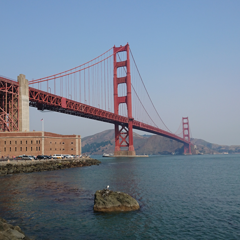
將圖像以字典 {"image": <source>} 傳入,其中 <source> 可以是檔案路徑、URL 或 PIL.Image 物件。
from PIL import Image
from IPython.display import display
import requests

IMAGE_SIZE = 240

img_url = "https://raw.githubusercontent.com/google-gemma/cookbook/refs/heads/main/apps/sample-data/GoldenGate.png"
input_image = Image.open(requests.get(img_url, stream=True).raw).resize((IMAGE_SIZE, IMAGE_SIZE))

print("Input Image:")
display(input_image)

# Embed the image directly from a URL, file path, or PIL Image object
emb_goldengate = model.encode({"image": img_url})

# Compare the image embedding against another image and text candidates
example_img_url = "https://raw.githubusercontent.com/google-gemma/cookbook/refs/heads/main/apps/sample-data/kitchen_painting.jpg"
example_image = Image.open(requests.get(example_img_url, stream=True).raw).resize((IMAGE_SIZE, IMAGE_SIZE))

candidates = [
    {"image": example_img_url},
    "San Francisco",
    "a cute cat walking",
    "a friendly dog sitting in the grass",
]
emb_candidates = model.encode(candidates)
image_similarities = model.similarity(emb_goldengate, emb_candidates)[0]

print("\nSimilarity with candidates:\n"+"-"*80)
for idx, score in enumerate(image_similarities):
    if idx == 0:
        display(example_image)
    else:
        print(candidates[idx])
    print(f" `-> 🤖 score: {score:.3f}\n")
Similarity with candidates:
--------------------------------------------------------------------------------

 `-> 🤖 score: 0.585

San Francisco
 `-> 🤖 score: 0.641

a cute cat walking
 `-> 🤖 score: 0.534

a friendly dog sitting in the grass
 `-> 🤖 score: 0.509
請注意,文字查詢 "San Francisco" 與金門大橋照片的跨模態相似度最高。
自訂圖像處理參數
您可以透過 processing_kwargs 調整每次推論呼叫的視覺詞元預算:
img_processing_args = {
    "image": {
        "max_soft_tokens": 1120,
    }
}

emb_goldengate = model.encode({"image": img_url}, processing_kwargs=img_processing_args)
emb_candidates = model.encode(candidates, processing_kwargs=img_processing_args)
image_similarities = model.similarity(emb_goldengate, emb_candidates)[0]

print("Similarity with candidates:\n"+"-"*80)
for idx, score in enumerate(image_similarities):
    if idx == 0:
        display(example_image)
    else:
        print(candidates[idx])
    print(f" `-> 🤖 score: {score:.3f}\n")
Similarity with candidates:
--------------------------------------------------------------------------------

 `-> 🤖 score: 0.568

San Francisco
 `-> 🤖 score: 0.674

a cute cat walking
 `-> 🤖 score: 0.545

a friendly dog sitting in the grass
 `-> 🤖 score: 0.531
您可以選擇 70、140、280、560 或 1120 詞元的預算大小。提高輸入圖像的視覺預算會以延遲與詞元數換取品質。
處理音訊
以 {"audio": <source>} 傳入音訊輸入。支援的音訊來源包括本機檔案路徑、URL,或記憶體內波形(1D/2D float32 NumPy 陣列或 PyTorch 張量)。音訊檔案會自動解碼並重新取樣為 16 kHz。
from IPython.display import display, Audio

aud_url = "https://ai.google.dev/gemma/docs/audio/roses-are.wav"

print("Input Audio:")
display(Audio(aud_url))

# Embed audio directly from a URL or file path
emb_speech = model.encode({"audio": aud_url})

# Compare audio embedding with text descriptions
candidates = [
    "a person speaking English",
    "random static white noise",
    "Roses are red, violets are blue.",
]
emb_candidates = model.encode(candidates)
audio_similarities = model.similarity(emb_speech, emb_candidates)[0]

print("\nSimilarity with candidates:\n"+"-"*80)
for idx, score in enumerate(audio_similarities):
    print(candidates[idx])
    print(f" `-> 🤖 score: {score:.3f}\n")
Similarity with candidates:
--------------------------------------------------------------------------------
a person speaking English
 `-> 🤖 score: 0.679

random static white noise
 `-> 🤖 score: 0.651

Roses are red, violets are blue.
 `-> 🤖 score: 0.876
處理影片
以 {"video": <source>} 傳入影片輸入。模型原生解碼 MP4 檔案/URL 並取樣影片幀。您也可以傳入預先擷取的幀,作為 PIL.Image 物件列表或 4D/5D 張量。
from IPython.display import display, Video

vid_url = "https://github.com/bebechien/gemma/raw/refs/heads/main/videos/cat_dozing.mp4"

print("Input Video:")
display(Video(vid_url))

# Embed video directly from a URL or file path
emb_video = model.encode({"video": vid_url})

# Compare video embedding with text descriptions
candidates = [
    "a cat dozing",
    "a cat playing with a small lizard",
    "a sports car racing on a highway",
]
emb_candidates = model.encode(candidates)
video_similarities = model.similarity(emb_video, emb_candidates)[0]

print("\nSimilarity with candidates:\n"+"-"*80)
for idx, score in enumerate(video_similarities):
    print(candidates[idx])
    print(f" `-> 🤖 score: {score:.3f}\n")
Similarity with candidates:
--------------------------------------------------------------------------------
a cat dozing
 `-> 🤖 score: 0.688

a cat playing with a small lizard
 `-> 🤖 score: 0.602

a sports car racing on a highway
 `-> 🤖 score: 0.440
FPS 說明
預設情況下,影片以 每秒 1 幀的取樣幀透過視覺編碼器處理;FPS 取樣率可設定。
自訂影片處理參數
您可以透過 processing_kwargs 調整每次推論呼叫的幀取樣行為:
# Override video processing parameters for a specific encode() call
emb_video_custom = model.encode(
    {"video": vid_url},
    processing_kwargs={
        "video": {
            "max_frames": 16,               # Maximum frames to keep (default is 32)
            "fps": None,                    # Frames per second to extract (None keeps all up to max_frames)
            "overflow_strategy": "uniform", # How to sample when total frames exceed max_frames ('uniform' or 'truncate')
            "add_timestamps": True,         # Whether to insert frame timestamps into the multimodal sequence
        }
    },
)

video_similarities = model.similarity(emb_video_custom, emb_candidates)[0]

print("Similarity with customized video processing:\n"+"-"*80)
for idx, score in enumerate(video_similarities):
    print(candidates[idx])
    print(f" `-> 🤖 score: {score:.3f}\n")
Similarity with customized video processing:
--------------------------------------------------------------------------------
a cat dozing
 `-> 🤖 score: 0.739

a cat playing with a small lizard
 `-> 🤖 score: 0.668

a sports car racing on a highway
 `-> 🤖 score: 0.492
交錯式多模態輸入
EmbeddingGemma 2 在單次查詢中支援豐富的混合模態輸入:
- 多模態字典: 在同一字典中傳入多個鍵(
"text"、"image"、"audio"、"video")以自動組合模態。 - 顯式佔位符交錯: 在
"text"字串中使用<|image|>、<|audio|>與<|video|>標籤,控制媒體項目插入的精確詞元位置。
img_url = "https://raw.githubusercontent.com/google-gemma/cookbook/refs/heads/main/apps/sample-data/GoldenGate.png"
example_img_url = "https://raw.githubusercontent.com/google-gemma/cookbook/refs/heads/main/apps/sample-data/kitchen_painting.jpg"
aud_url = "https://ai.google.dev/gemma/docs/audio/roses-are.wav"
vid_url = "https://github.com/bebechien/gemma/raw/refs/heads/main/videos/cat_dozing.mp4"

# 1. Multimodal query combining text, multiple images, and audio
query_multimodal = {
    "text": "Landmark and interior photos with spoken narration",
    "image": [img_url, example_img_url],
    "audio": aud_url,
}
emb_multimodal = model.encode(query_multimodal)

# 2. Interleaved query using placeholders to specify media ordering in text
query_interleaved = {
    "text": "Compare the scene in <|video|> with <|image|> and <|image|>.",
    "image": [img_url, example_img_url],
    "video": vid_url,
}
emb_interleaved = model.encode(query_interleaved)

# 3. Media-only interleaving using placeholders to control sequence order
query_media_sequence = {
    "text": "<|image|><|audio|><|image|>",
    "image": [img_url, example_img_url],
    "audio": aud_url,
}
emb_media_sequence = model.encode(query_media_sequence)

print("Multimodal embedding shape:", emb_multimodal.shape)
print("Interleaved embedding shape:", emb_interleaved.shape)
print("Media sequence embedding shape:", emb_media_sequence.shape)
Multimodal embedding shape: (768,)
Interleaved embedding shape: (768,)
Media sequence embedding shape: (768,)
摘要與後續步驟
您現在已經知道如何使用 EmbeddingGemma 2 與 sentence-transformers 函式庫,產生跨文字、圖像、音訊和影片的統一多模態與跨模態嵌入,以及如何設定模態編碼器與自訂影片處理參數。